
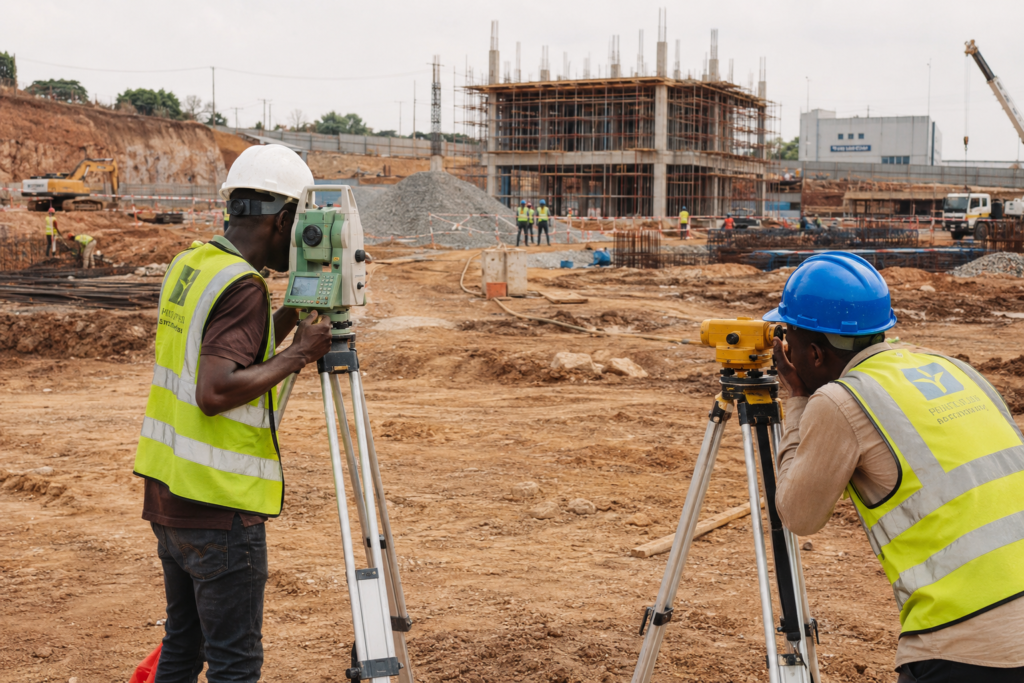
A site engineer in Lagos sets up a drone survey program to cut down on manual chainage and levelling work. Three months in, the drone data sits in one software format, the BIM model sits in another, and nobody on the quantity surveying team can pull the two together without exporting to Excel and manually reconciling volumes. The technology worked. The workflow around it didn’t. This is the pattern behind most automation challenges in construction today — the tools are rarely the problem; the systems, skills, and site conditions around them are.
This is a common story across contractors adopting automated survey tools, robotic total stations, and semi-autonomous plant. The equipment performs as specified on the data sheet. What breaks down is everything downstream: data handling, staff competence, procurement timelines, and site conditions that don’t match the vendor’s demo environment. This article works through where automation actually breaks in construction projects, why it breaks there, and what a contractor or consultant can do about it before signing off on the next capital purchase.
Automation challenges: Quick Answer
The main automation challenges in construction are data interoperability between systems, a shortage of staff trained to operate and maintain automated equipment, high upfront capital cost relative to project margins, unreliable site connectivity, and resistance from teams used to manual methods. Most failures trace back to poor integration planning rather than equipment malfunction.

What Automation Means on a Construction Site
Automation is the use of software, sensors, and machinery to perform construction tasks with reduced manual intervention, ranging from automated quantity take-offs to robotic total stations and semi-autonomous earthmoving plant. On a typical project, automation shows up in three layers: data capture (drones, laser scanners, IoT sensors), data processing (BIM-linked estimating software, scheduling algorithms), and physical execution (robotic rebar tying, automated concrete placement, GPS-guided grading).
Each layer depends on the one before it. A drone survey is only useful if the point cloud it generates can be imported cleanly into the design software the structural team is using. An automated concrete batching system is only as accurate as the mix design data fed into it. When contractors evaluate automation purely as equipment purchases, they miss that the real deliverable is a working data chain from capture to execution — and it’s the chain, not any single link, that tends to fail first.
Why Adoption Looks Easier Than It Is
Vendor demonstrations happen in controlled conditions: stable power, reliable internet, clean data sets, and a technician who knows the software inside out. Real sites in Lagos, Abuja, or Port Harcourt rarely offer all four at once. Power fluctuations affect sensor calibration. Poor connectivity delays cloud-based data sync. And the technician who ran the demo isn’t the person operating the equipment six months later, once the initial excitement has faded and the original champion has moved to another project.
The Gap Between Pilot and Scale
A pilot on one project, run by an enthusiastic project manager with vendor support on call, is not the same as automation running unattended across five sites with rotating staff. Pilots succeed because they get disproportionate attention. Scaling exposes every shortcut taken during the pilot phase — undocumented workarounds, informal training, and manual data cleanup that nobody wrote into a standard operating procedure.
You can learn more about how these systems function individually in our guide to what automation covers in construction, which sets out the baseline before this article goes into where it breaks down.
The Technical Barriers Behind Automation Challenges
Three technical issues account for most of the friction contractors report once automated systems move past the pilot stage: data interoperability, connectivity, and integration with legacy processes.
Data Interoperability Between Platforms
Most construction firms run more than one software platform — a BIM authoring tool, a separate estimating package, a scheduling tool, and often a field-data app for drones or scanners. Few of these were built by the same vendor, and file format compatibility between them is inconsistent. A point cloud exported as an E57 file might import cleanly into one BIM platform and require third-party conversion for another. Interoperability failures like this cost time on every single data handoff, and on a project with weekly survey cycles, that time compounds fast.
The practical fix is standardising on open formats (IFC for BIM data, LandXML for survey and civil data) at the procurement stage, before equipment is purchased — not after the first failed data transfer. Related coverage on model coordination is available in our overview of building information modelling, since BIM interoperability underpins most automated data workflows on a modern project.
Connectivity and Power Reliability on Site
Automated systems that rely on real-time data sync — cloud-based scheduling dashboards, IoT sensor networks, remote-monitored plant — need connectivity that many sites simply don’t have consistently. A GSM signal that drops for two hours during a downpour isn’t a hypothetical; it’s a Tuesday on many sites outside major urban centres. Systems that store data locally and sync when connectivity resumes hold up far better than those built around constant cloud dependency.
Retrofitting Automation Into Manual Workflows
Introducing one automated process into a workflow built around manual steps creates friction at the interface points. If your quantity surveyors have spent a decade producing take-offs manually from drawings, an automated BIM-based quantity extraction tool changes not just their tool but their entire checking method — and if the automated output doesn’t match what they’re used to verifying, trust in the system erodes fast, regardless of accuracy.
Regulatory and Local Context Behind Slow Adoption
Automation adoption doesn’t happen in a regulatory vacuum. In markets regulated by COREN (Council for the Regulation of Engineering in Nigeria) and similar bodies elsewhere, professional sign-off responsibilities still sit with a registered engineer regardless of how much of the design or take-off process was automated. This matters directly: an automated structural analysis output still requires the same level of engineering scrutiny and sign-off under the relevant code — whether that’s BS 5950 for steelwork or BS 8110/Eurocode provisions for concrete — as a manually produced calculation.
Insurance and professional indemnity considerations add another layer. If an automated design tool produces an error that reaches site, liability questions around who verified the output — the software vendor, the engineer of record, or the firm — remain unresolved in many jurisdictions. Firms adopting automation at scale need documented verification protocols specifically so that automated outputs are checked by a competent person before they’re issued, not treated as final because a machine produced them.
Local site conditions compound the regulatory picture. Soil profiles across Lagos’ coastal reclaimed land, Abuja’s residual lateritic soils, and Port Harcourt’s soft alluvial deposits each demand different geotechnical judgment calls that automated design software, calibrated on generic soil models, doesn’t always handle without manual override. Our geotechnical engineering guide covers how ground conditions vary across these regions and why automated foundation design tools still need experienced review on variable ground.
Cost, Skills, and Cultural Resistance
Beyond the technical and regulatory layers, three human and financial factors determine whether automation sticks: capital cost against project margins, the availability of trained operators, and resistance from teams asked to change established methods.
Capital Cost Versus Margin Reality
A robotic total station can cost multiple times more than a conventional instrument, and a mid-sized contractor running on thin margins has to justify that spend against a specific, measurable time or accuracy saving — not a general sense that automation is the direction the industry is heading. Payback calculations should be project-specific: how many survey days does the tool save per project, multiplied by day rate and project volume, set against purchase and maintenance cost over a realistic equipment lifespan of five to seven years.
The Skills Shortage in Practice
Operating a robotic total station, a drone survey platform, or a BIM-linked scheduling tool requires training that most civil engineering and surveying curricula don’t yet cover in depth. Firms are left training staff internally, often through the equipment vendor, which creates a dependency: if the trained operator leaves, the equipment sits idle until someone new is trained. Building this into a documented internal training program, rather than relying on one person’s tacit knowledge, protects the investment.
Resistance From Experienced Site Staff
A foreman who has run levelling checks by hand for twenty years and never had a dispute over a wrong figure has a reasonable basis for skepticism about a new automated system, particularly if the first rollout attempt produced errors that took longer to trace than a manual check would have. Overcoming this isn’t about persuasion — it’s about running automated and manual methods in parallel long enough to build a track record, then handing over fully once the data has proven itself on that specific site.
These cost and skills pressures are covered in more depth in our breakdown of automation cost factors, which sets out typical payback periods across different equipment categories.
A Practical Approach to Managing Automation Challenges
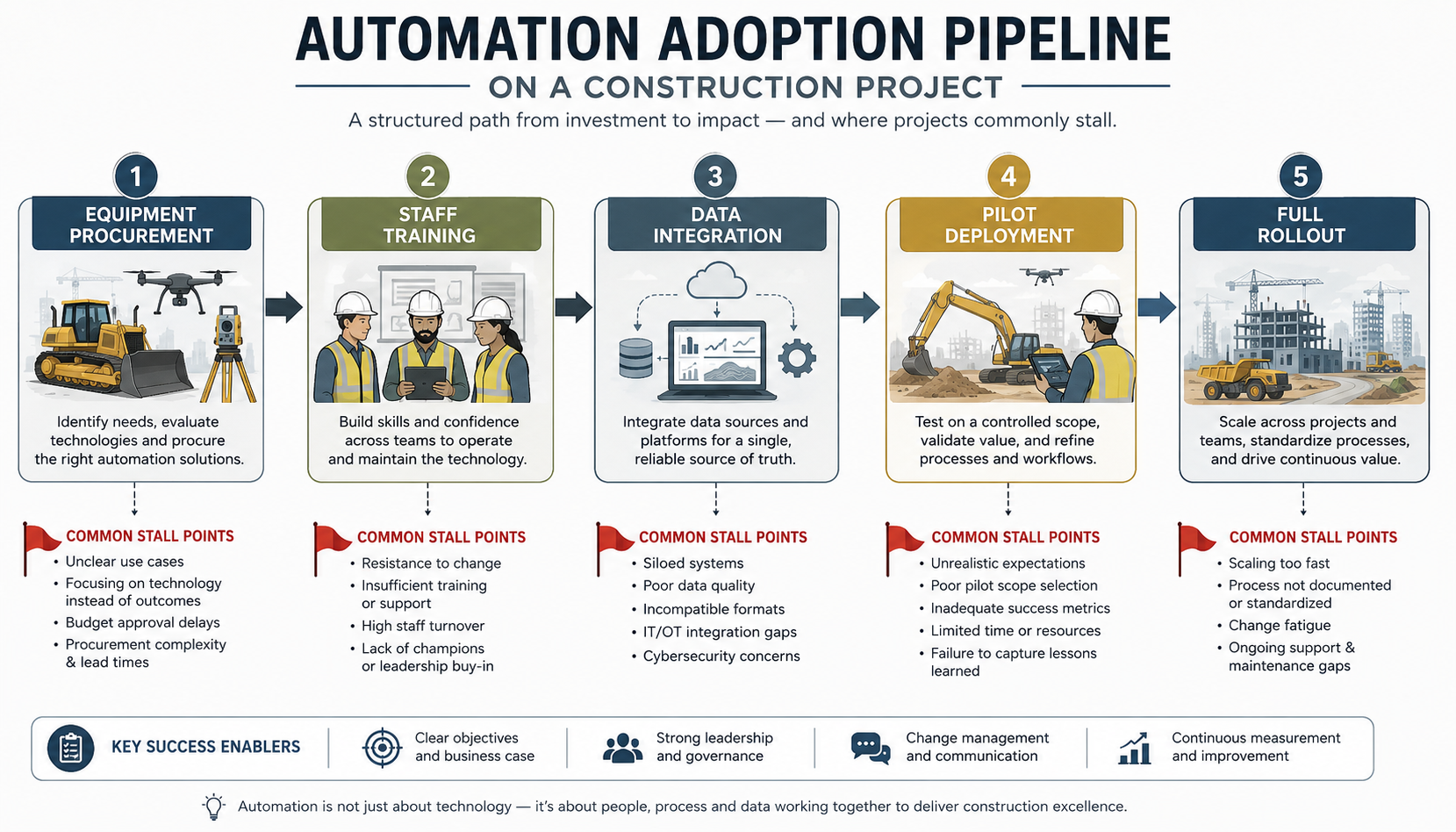
Contractors who get automation right tend to follow a similar sequence rather than jumping straight to full-site deployment. The steps below reflect what actually holds up across multiple projects, not just a single successful pilot.
- Map the full data chain before purchasing equipment. Identify every software platform the automated tool’s output needs to pass through, and confirm file format compatibility at each handoff point.
- Run a parallel-testing period. Keep the manual method running alongside the automated one for at least one full project cycle, comparing outputs directly rather than trusting the new system on day one.
- Document training as a standard operating procedure, not as informal knowledge held by one operator, so equipment doesn’t sit idle when staff move on.
- Confirm connectivity and power conditions on the specific site before assuming cloud-dependent tools will function reliably, particularly outside major cities.
- Assign sign-off responsibility explicitly for any automated design or survey output, in line with COREN or the relevant local regulatory requirement, so professional accountability doesn’t get lost between the software and the engineer of record.
Firms further along in adoption often extend this into a phased rollout, piloting automation on one project type before scaling across a portfolio. Our best practices for automation guide sets out that phased rollout approach in more detail, including how to sequence which processes to automate first.
Frequently Asked Questions About Automation
Q: What is automation in civil engineering?
A: Automation in civil engineering refers to using software, sensors, and machinery to carry out tasks — surveying, quantity take-offs, scheduling, and physical construction work — with reduced manual input. Common examples include drone-based topographic surveys, BIM-linked quantity extraction, and GPS-guided earthmoving equipment.
Q: Why do construction automation projects fail?
A: Most automation projects fail because of poor data integration between software platforms, insufficient staff training, and a mismatch between vendor demo conditions and real site conditions like unreliable power or connectivity. Equipment malfunction is rarely the primary cause; workflow and skills gaps are.
Q: How much does construction automation cost?
A: Costs vary widely by equipment category. A robotic total station typically costs several times more than a conventional instrument, while BIM-linked automation software is often licensed on an annual per-seat basis. Payback periods of two to four years are common when the tool addresses a specific, measurable time saving on a high project volume.
Q: What is the difference between automation and digital twins in construction?
A: Automation refers to tools and machinery that perform tasks with reduced manual input, such as automated data capture or robotic plant. A digital twin is a live, continuously updated virtual model of a physical asset, often fed by automated sensor data but distinct from the automation tools themselves. Automation frequently supplies the data a digital twin relies on.
Q: Do automated engineering outputs still need professional sign-off?
A: Yes. Under COREN and comparable regulatory frameworks elsewhere, a registered engineer remains responsible for verifying and signing off on any design, survey, or calculation output, regardless of whether it was produced manually or by an automated tool. Automation does not transfer professional liability to the software.
Automation Challenges: The Core Takeaway
Automation challenges in construction rarely come down to whether the equipment works — most of it does, reliably, under the right conditions. They come down to whether a firm has planned for data interoperability, trained staff properly, tested connectivity on the actual site rather than assumed it, and kept professional sign-off responsibility clear once a machine is involved in producing the output. Contractors who treat automation as a systems problem rather than a purchasing decision are the ones who see it stick past the pilot stage.
If you’re weighing automation options for an upcoming project — or trying to work out why a previous rollout stalled — StruviaCore’s engineering team can review your specific site conditions, data workflows, and regulatory obligations before you commit capital. Get in touch to discuss your project.
Leave a Reply